
Download BK Manager APK – Burger King, franchisee app, restaurant management, QSR news, promotions, mobile app, free app, Android app
Overview
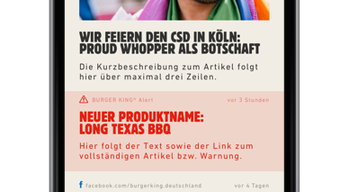
BK Manager is a free Android application developed by Burger King Deutschland GmbH, specifically designed for BURGER KING® franchisees. The app serves as a dedicated information hub, providing franchise owners with timely updates on market developments, promotional campaigns, and operational insights within the quick-service restaurant (QSR) industry. Its primary purpose is to ensure franchisees remain informed and aligned with corporate strategies, enabling better decision-making and business continuity. Target users include BURGER KING franchise operators who require immediate access to relevant business intelligence while on the go.
The app functions as a digital reference tool, consolidating key updates, marketing materials, and internal communications in a centralized, mobile-accessible format. Real-world usage scenarios include reviewing new menu launches, preparing for seasonal promotions, monitoring competitive trends, and staying compliant with brand standards. Access to the app is restricted to approved franchisees, ensuring content remains secure and targeted. The developer did not provide additional information about the company’s background beyond its name.
Key Features & Capabilities
- Real-time Market and Promotional Updates – The app delivers the latest news and marketing campaigns directly from Burger King Deutschland GmbH, allowing franchisees to stay ahead of industry trends and consumer demands.
- Centralized Business Intelligence – All essential information, including operational guidelines, promotional calendars, and brand updates, is consolidated in one place for easy access.
- Franchisee-Only Access – The application is restricted to verified franchisees, ensuring that sensitive business data and internal communications remain secure and exclusive.
- Mobile-First Design – Optimized for Android devices, the app supports on-the-go access, enabling franchisees to stay informed from any location, whether at a store, during travel, or at home.
- Feedback and Support Integration – Users can submit suggestions, bug reports, or requests by email, with the developer requesting device model and OS version for technical troubleshooting.
These features support efficient workflow management by reducing reliance on email chains or physical documents. For example, a franchisee can quickly review a new promotional campaign before launching it in-store, ensuring brand consistency and timely execution.
User Interface, Workflow & Performance
The user interface of BK Manager is designed for clarity and efficiency, focusing on delivering content in a structured, easy-to-navigate format. Navigation is likely based on a menu-driven layout with sections for news, promotions, and internal updates. The app’s workflow prioritizes quick access to critical information, minimizing the number of steps required to view key updates.
As a mobile application built for Android, it is expected to operate smoothly on a range of devices. However, exact performance details were not specified by the developer. Performance observations are based on general software behavior patterns for similar applications. The app does not require significant system resources, and its 12.5 MB size suggests lightweight operation. Stability and CPU/RAM behavior were not publicly documented.
Compatibility & System Requirements
BK Manager is designed for Android operating systems. The current version is 2.1.2, with a file size of 12.5 MB. The app is available for download via Google Play, indicating compatibility with devices running supported Android versions. However, exact system requirements were not listed.
Platform compatibility information is limited to the Android platform. The developer did not specify minimum Android version, screen resolution, or hardware capabilities required. Users should ensure their device meets standard Android app requirements for installation and operation. The app’s size and nature suggest it will run on most modern Android smartphones and tablets.
Pros and Cons
Pros
- Free to download and use
- Specifically tailored for BURGER KING franchisees
- Provides timely access to promotions and market news
- Secure, restricted access ensures content integrity
- Mobile access enables on-the-go updates
Cons
- Only available on Android, limiting cross-platform access
- No information on minimum system requirements
- Requires approval to access, which may delay onboarding
- Feedback mechanism relies on email, not in-app reporting
- Not available for iOS or other platforms
FAQ Section
Is BK Manager available for iOS devices?
The app is currently only available for Android. There is no official iOS version announced.
How do I get access to BK Manager?
Access is granted after signing up and being approved as a BURGER KING franchisee. The developer does not provide public sign-up links.
Is BK Manager safe to download?
Yes, the app is distributed through Google Play, which applies security checks. It is developed by Burger King Deutschland GmbH, a known entity in the QSR sector.
Does the app require an internet connection?
Yes, the app requires an active internet connection to access real-time updates, promotions, and news.
Can I update BK Manager manually?
Updates are typically managed through Google Play. Manual installation is not recommended unless explicitly supported by the developer.
Final Thoughts
BK Manager stands out as a focused, purpose-built tool for BURGER KING franchisees seeking reliable access to essential business information. Its design prioritizes relevance, security, and accessibility, making it a valuable asset in maintaining brand alignment and operational efficiency. While limited to Android and requiring franchisee approval, the app delivers clear value for its intended audience. For BURGER KING operators who need to stay informed about promotions, market trends, and internal updates, BK Manager offers a streamlined, secure, and free solution. The absence of a broader platform presence may be a drawback for some users, but its targeted functionality compensates for this limitation.
Download BK Manager now





.png)

